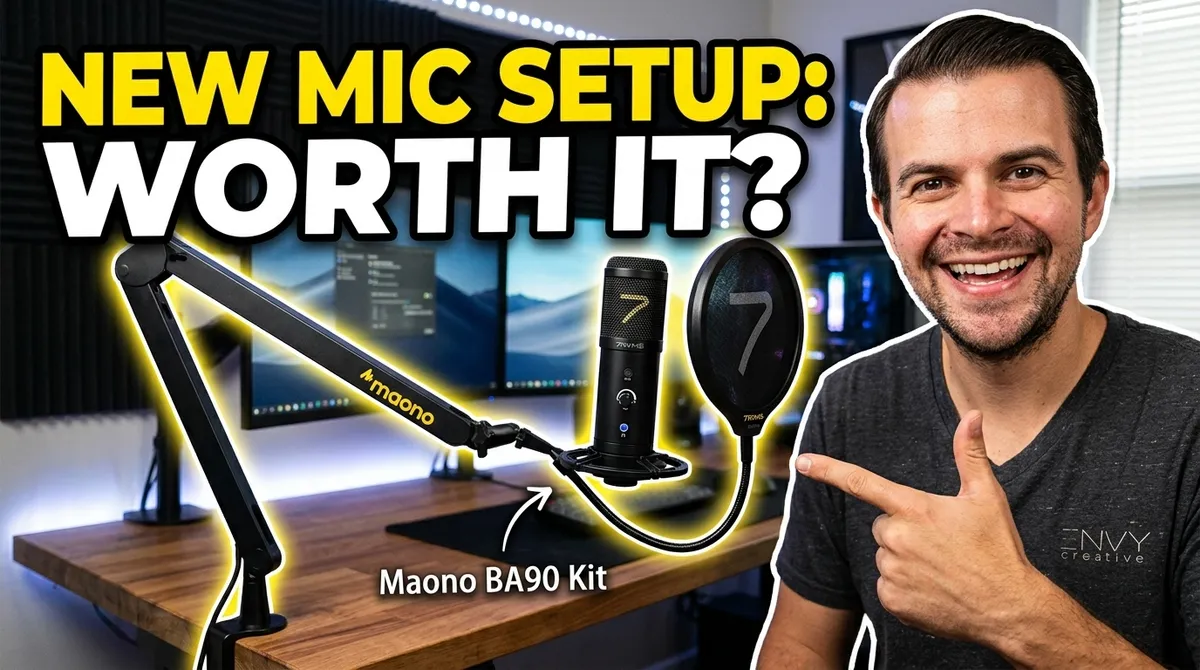
Maono BA90 Kit Review: A Cleaner Desk Mic Setup for Calls and Content
A practical review of the Maono BA90 Kit after setting it up on a creator desk, with notes on the boom arm, cable management, USB connection, and whether it is worth it for calls and content.
A good desk microphone setup has one job before everything else: it needs to sound better without making the desk harder to use. That is why the Maono BA90 Kit caught my attention. It gives you the familiar creator setup, a USB microphone on a boom arm with a shock mount and pop filter, but the real question is whether it feels like a useful upgrade once it is actually clamped to the desk.
After setting it up in our own workspace, my short answer is yes, for the right person. This is not the kind of mic kit I would treat as a magic studio replacement, and it is not the only way to get clean audio. But for calls, simple voiceover work, desk videos, livestreams, and casual content creation, the BA90-style setup solves a very real problem: getting the microphone close to your voice, then getting it out of the way when you are done.
What Stands Out During Setup
The setup process is straightforward. In the video, the main work was clamping the arm to the desk, tightening the joints, attaching the microphone mount, and routing the cable cleanly underneath the arm and desk. That part matters more than people think. A desk mic that looks clean is easier to leave installed, and a mic you leave installed is the one you will actually use.
Maono says its current boom arm models use common 3/8-inch and 5/8-inch thread standards, which helps with compatibility across many microphones and accessories. The Maono compatibility guidance is useful if you are planning to swap the included mic later or mount a different microphone on the arm. For this kit, the practical setup experience was simple: clamp it, attach the mic, run the cable, plug it in, and test.
The Boom Arm Is the Real Upgrade
The biggest improvement is not just the microphone. It is the arm. A boom arm lets you bring the mic close to your mouth for calls or recording, then push it back behind the monitor when you are finished. That sounds minor until you use it every day. A microphone sitting on a short desktop stand usually competes with your keyboard, mouse, coffee, notepad, and camera framing. A boom arm gives the mic a home that does not take over the desk.
In this setup, the arm moves into position easily for calls and then tucks away behind the desk area. That is exactly what I want in a creator workspace. If you are making client videos, recording screen shares, joining sales calls, or filming product walkthroughs, you do not want to rebuild your audio setup every time. You want to pull it in, hit record, and move on.
If your business needs polished video content that looks and sounds intentional, not improvised, Think Envy can help create custom video content built around your brand, your product, and your audience.
USB Is Convenient, With One Small Catch
The microphone connection in the video used USB, and because the computer's USB-C ports were already occupied, the setup needed a small USB-C to USB-A adapter. That is not a dealbreaker, but it is worth noting. Before buying any USB mic kit, check your desk, hub, dock, and open ports. If your laptop is already full of drives, displays, chargers, and cameras, you may need an adapter or a powered hub.
The upside is that USB keeps the setup simple. You do not need an audio interface, XLR preamp, or complicated routing just to sound better on calls. Maono's own USB microphone collection notes the same general advantage of USB mics, simple computer compatibility and plug-and-play use for most setups. That is the audience this kit makes sense for: creators and business owners who want better desk audio without building a full audio rack.
Do You Need the Pop Filter and Windscreen?
The kit includes accessories, but you may not need every piece for every use. In the video, the first impression was that the pop filter and windscreen might not be necessary for the normal call setup. That is a fair instinct. If you are speaking slightly off-axis, keeping a sensible distance, and not pushing heavy plosive sounds directly into the capsule, you may get a cleaner-looking setup without the extra filter in frame.
That said, the pop filter can still help if you record close voiceovers, podcast-style audio, or energetic talking-head videos. I would treat it as optional, not mandatory. Use it when the audio test says you need it, not just because it came in the box.
Who This Kit Makes Sense For
The Maono BA90 Kit makes the most sense for people who live on calls or create simple desk content. Think consultants, founders, marketers, YouTubers, streamers, course creators, and small teams that need an audio upgrade without turning the workspace into a studio. The real win is speed. You can leave the mic installed, pull it in for a Zoom call or recording, and push it away when you are done.
- Good fit: desk-based calls, creator videos, tutorials, livestreams, simple voiceovers, and remote meetings.
- Less ideal: travel recording, untreated noisy rooms, or high-end music and vocal production where you need more control.
- Best setup habit: run a quick test recording, adjust input gain, and place the mic close enough that you do not need to shout or over-process the audio.
What I Would Watch Out For
Any boom arm depends on the desk it is clamped to. A thin, fragile, glass, or oddly shaped desktop can make mounting harder. Make sure the clamp has a solid surface, and do not overtighten it on a desk that cannot handle pressure. Also, cable routing is worth doing neatly on day one. If the cable hangs loosely or gets pinched by the arm, the whole setup feels less premium.
The other thing to watch is room noise. A better mic will not automatically fix a loud keyboard, reflective room, fan noise, or bad mic placement. Put the mic near your mouth, keep the gain reasonable, and test the sound before an important call. That one minute of testing matters more than almost any spec sheet.
Final Verdict: Worth It?
For a practical desk setup, the Maono BA90 Kit is worth considering if you want a cleaner, more flexible microphone setup for calls and content. The boom arm is the star because it makes the microphone easy to use and easy to hide. The USB connection keeps things simple, and the included accessories give you room to tune the setup depending on whether you are doing calls, voiceovers, or videos.
It is not a substitute for a fully engineered studio, but that is not really the point. The point is having a mic that is ready when you are. For a creator desk, home office, or small business video workflow, that is a meaningful upgrade.
If you are upgrading your own content workflow and want the finished videos to look as clean as your new desk setup sounds, work with Think Envy on custom video content that is scripted, filmed, edited, and built for your actual marketing goals.